Motionly: Image to Video AI
- 4.3
- Rating
- 50.00K
- Installs
- Free
- Price

 Analysis by App-foxy
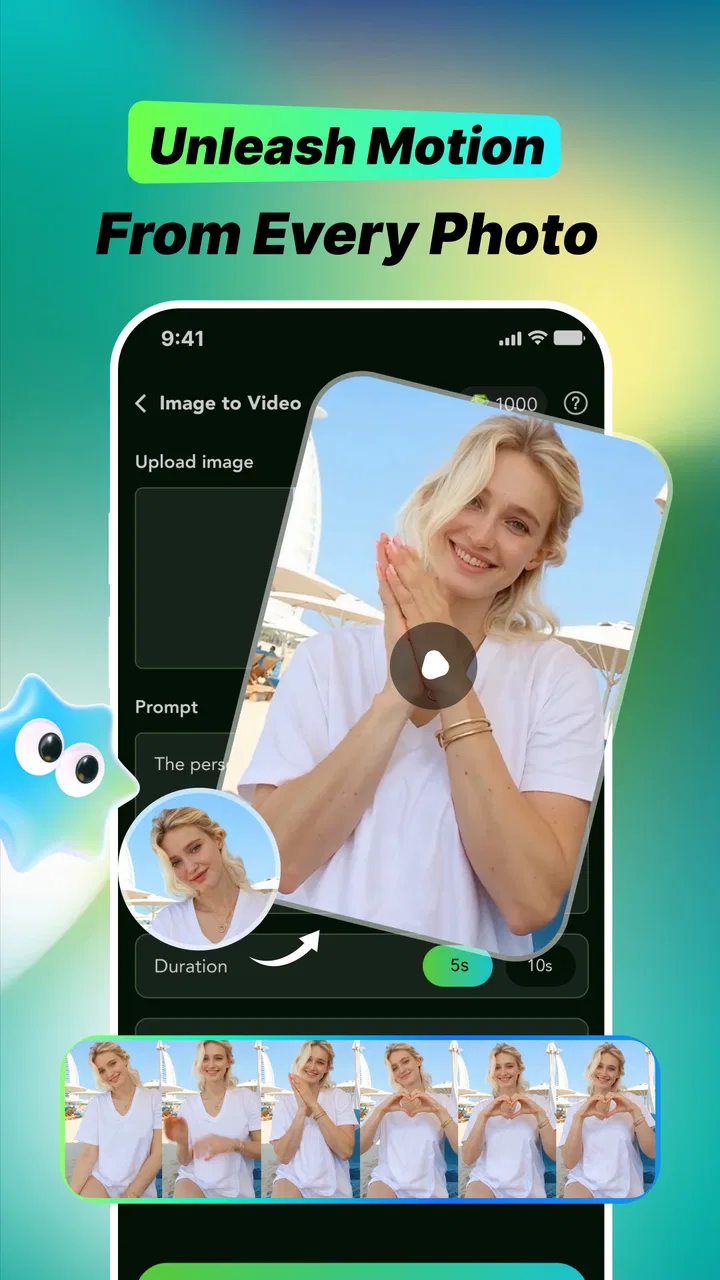
Motionly: Image to Video AI is the kind of entertainment app I open when a still photo feels too quiet. Its basic idea is simple: take an image, apply an AI-driven motion treatment, and turn it into a short visual piece with a more lively, shareable feel. I found the appeal less in replacing a full video editor and more in giving ordinary pictures a quick creative lift without requiring advanced editing skills.
That makes it interesting for people who want to experiment rather than build a polished film from scratch. A family snapshot, travel image, pet photo, artwork, or social post can become a moving clip with the help of templates and effects. The results depend heavily on the source image and the chosen style, but the process is approachable enough for casual use. I would describe it as a playful creation tool, not a complete production suite.
How Motionly feels to use in everyday situations
The app comes from GeorgeGun and sits in the entertainment category. It is free to install, with optional purchases ranging from $1.99 to $99.99 per item. That pricing detail matters because the first experiment may feel effortless, while regular use can make you think more carefully about which creative treatments are worth paying for.
You May Also Like

 Pandora - Music & Podcasts
Pandora’s Music Is Easy to Start, but Harder to Recover
Pandora’s strength is its low-effort path from a seed to a station. Its weak spot is how much confidence it asks you to place in connection, setup, and quiet recovery.

 8 Ball Pool
 Is Built on Rivalries, Rematches, and Routine
A close look at the rivalries, rematches, shared routines, and unanswered safety questions that turn a quick pool match into a persistent mobile community.

 Samsung Music
’s Quiet Strength Is Playing What You Already Own
Its reach comes less from spectacle than from dependable access to a personal library. That simplicity is both the app’s strongest retention engine and its ceiling.

 AccuWeather: Weather Radar
AccuWeather Review: A Quick, Clear Forecast for Everyday Decisions
For everyday plans, the best forecast is the one you can understand quickly. AccuWeather makes rain timing, radar, and local conditions easy to act on, with a few trade-offs.

 Hill Climb Racing
Why Hill Climb Racing Still Turns Crashes Into One More Run
A tiny car, a bumpy hill and one more upgrade: Hill Climb Racing keeps resurfacing because its simple chaos makes every near-miss feel personal.

 AliExpress - Shopping App
AliExpress Makes Global Shopping Feel Personal, but Shoppers Bear the Risk
AliExpress turns a global marketplace into a pocket-sized discovery engine. Its reach is useful, its shopping loop compelling, and its trade-offs easy to miss.
More From Our News Desk
View All News


On Android, it supports version 7.0 and later, so it is not restricted to only the newest phones. The current release is version 1.0.2. I would still judge the experience on the individual device, because AI image processing can feel more comfortable on a recent phone than on older hardware, especially when working with larger photos or trying several variations in a row.
The app has an average rating of 4.3 from around forty ratings and has passed fifty thousand installs. Those figures suggest that it has found a modest audience, but they are not a reason to assume every image will look perfect. AI animation is naturally unpredictable: a face, hand, reflection, or detailed background can produce a result that feels charming in one attempt and awkward in the next.
Readability and navigation for first-time creators
What I like about this type of workflow is that it reduces the number of decisions. Instead of presenting a traditional timeline, layers, keyframes, and a long list of technical controls, Motionly focuses attention on the photo, the visual treatment, and the final result. For someone who finds conventional editing software intimidating, that narrower path can make the app feel much easier to approach.
The main challenge is that creative apps often communicate through previews rather than detailed explanations. A template may look obvious once you see its example, but less clear before you try it. I recommend starting with a photo that is easy to replace and testing one style at a time. That makes it easier to understand what the effect is doing instead of changing several choices and losing track of why the result changed.
For readability, the most useful habit is to avoid judging a template only by its thumbnail. A small preview can hide distracting movement, strange transitions, or an effect that works better with a portrait than with a landscape. I found it more sensible to treat each preview as a suggestion, then inspect the generated clip before deciding whether it is worth keeping.
This is also where the app differs from a conventional video editor. A timeline editor gives me precise control over when movement begins, how long it lasts, and which part of a frame changes. Motionly’s attraction is speed and simplicity, but that simplicity also means I need to accept more of the app’s interpretation. If your priority is exact control, a traditional editor remains the stronger choice.
Motor and sensory considerations
Motionly can be a comfortable option for people who prefer short, visually guided interactions over complicated editing gestures. The basic concept does not require me to draw paths, trim several tracks, or place tiny timeline markers with precision. That can reduce the amount of fine motor work involved in making something presentable.
There is a trade-off, though. A simplified interface does not automatically solve every access need. If a person relies on larger text, strong contrast, screen-reading support, reduced motion, or very precise focus order, the practical experience may depend on how the app and the phone handle those settings. I would test the first creation before committing to frequent use, particularly if animated previews or moving results cause discomfort.
The visual nature of the product also means that users with limited vision may need to rely more on device-level magnification or other personal tools. The app’s core appeal comes from seeing the image change, so someone who cannot comfortably inspect visual previews may not get the same value from it. In that situation, a tool with clearer text descriptions and more direct controls could be a better fit.
For users who are sensitive to rapid movement, I suggest keeping the first test deliberately simple: choose a calm image, select a restrained-looking treatment, and review the output in a comfortable setting. This is one of the more important practical tips because the most dramatic template is not necessarily the most usable one. Subtle motion can communicate the idea without making the final clip visually tiring.
Audio is not the reason I would choose this app. Its central experience is transforming an image visually, so anyone looking for detailed sound editing, captions, narration, or a carefully controlled spoken presentation should look toward a broader video tool. Motionly may complement that workflow, but I would not treat it as a replacement for one.
Situational access: where the app fits best
The strongest everyday use case is a quick social moment. Imagine taking a photo during a birthday gathering, selecting a suitable visual treatment, and creating a short clip before the conversation moves on. You do not need to organize a project or learn a full editing interface. The app is useful when the goal is to make one image feel more memorable while the moment is still fresh.
It can also help someone who has ideas but little patience for technical production. A small business owner might want to test a moving product image, an artist could explore how a still illustration feels with motion, and a casual creator could turn a travel photo into a more engaging post. In each case, I would use the output as a quick concept first, not assume it is automatically ready for professional publication.
Another practical workflow is to prepare a small set of source images before opening the app. Choose photos with a clear subject, enough visual separation from the background, and no important details cut off at the edges. Then make one version from each image rather than repeatedly forcing one difficult photo to work. This saves time and gives a more honest comparison of the app’s strengths.
It is also worth keeping the original photo untouched. AI effects can be fun, but they are exploratory. I prefer to preserve the source, create a few variations, and only share the version that still looks natural after I watch it more than once. A result that seems impressive in the first second can reveal odd movement when viewed repeatedly.
The mature 17+ content rating is another reason to consider context before handing the app to a younger user. I would not treat it as a general-purpose children’s creativity tool. Adults should make the decision based on the rating and the intended use, especially when the phone is shared among family members.
Creative trade-offs behind the quick results
The biggest strength is the low barrier between an idea and a finished-looking experiment. I can begin with a single image instead of gathering video footage, arranging clips, and learning a timeline. That makes Motionly more inviting than many editing apps when I only want a quick visual result.
The biggest weakness is the loss of precision. An AI-generated movement may not match what I imagined, and I cannot approach the process with the same certainty I would have in a manual editor. The app works best when I treat unexpected results as part of the experiment. It works less well when I need a subject to move in an exact direction or when a brand image must remain perfectly controlled.
Source material makes a noticeable difference. A clean portrait with a clear subject gives the effect a better chance of looking intentional than a crowded scene with overlapping people and fine details. This is not a reason to avoid challenging photos altogether, but it is a useful way to set expectations. If a first attempt looks strange, I would test a simpler image before blaming the whole app.
Templates and effects are valuable because they provide a starting point, but they can also make creations look similar if used without much thought. My advice is to choose the treatment based on the mood of the picture rather than selecting the most energetic option. A quiet landscape may benefit from restrained movement, while a celebratory image can tolerate something more noticeable.
The optional purchase range deserves attention before regular use. Free access makes it easy to try the concept, but the presence of individual purchases means I would check the cost of a desired item before building a workflow around it. Someone who only creates occasional clips may find the free entry point sufficient; someone planning frequent content should decide whether the paid options justify their place in the budget.
Remaining barriers before you make it your main editor
Motionly is not the right choice for every creator. I would skip it if I needed multi-scene storytelling, detailed color correction, exact timing, advanced audio work, or reliable control over every frame. A conventional mobile video editor may feel slower at first, but it gives more predictable results when the project has strict requirements.
I would also be cautious about using it for images where accuracy is essential. Important text, product labels, architectural lines, hands, and faces can be especially unforgiving when an automated effect interprets them creatively. For a casual post, an unusual result may be entertaining. For a client presentation or formal announcement, that same result can look careless.
Another barrier is the need to inspect the final clip rather than trusting the generation step. This is easy to overlook because the app’s purpose is to make creation feel quick. I would watch the complete result, check the subject’s appearance, and confirm that the motion does not distract from the message. That extra review is essential when sharing the clip publicly.
People who need a highly predictable interface should also test the app in their own setup. Device age, display preferences, personal sensitivity to motion, and comfort with visual selection all affect the experience. I would not promise the same level of ease for everyone simply because the basic workflow is uncomplicated.
Finally, the mature rating means the app should be chosen deliberately rather than installed casually on a child’s device. That consideration is separate from how easy it is to create an animation. A friendly-looking creative interface does not change the age guidance attached to the product.
My inclusive verdict
I see Motionly: Image to Video AI as a focused, playful way to animate still images without committing to a full editing course. Its best audience is adults who want quick experiments, social-ready visual ideas, or a simple way to add movement to a favorite photo. The free starting point makes trying it less demanding, while the optional purchases mean frequent creators should keep an eye on their spending.
Its accessibility story is strongest when simplicity matters: fewer editing decisions, less fine timeline work, and a direct path from photo to animated result. It is less convincing for people who need exact controls, detailed nonvisual guidance, predictable motion, or a complete audio-and-video workspace. Those users may be better served by a more traditional editor, even if that alternative takes longer to learn.
I would recommend trying it with a clear, low-stakes image first. Use a calm visual treatment, compare the result with the original, and decide whether the movement improves the photo or merely makes it busier. That small test reveals more than a store preview because it shows how the app fits your own images, your device, and your way of working.
My bottom line: Motionly is most successful as a quick creative spark, not as a precision editing replacement. If you enjoy seeing what an AI effect can invent and you are comfortable reviewing the result carefully, it is an entertaining addition to an Android phone. If control, consistency, or broad accessibility options are your top priorities, I would keep a conventional editor nearby and use this app only when speed and experimentation matter more than exactness.
FAQs for Motionly: Image to Video AI
01What is Motionly: Image to Video AI and what can it do?
Motionly: Image to Video AI is a creative tool designed to transform still images into short animated videos with the help of artificial intelligence. After uploading a photo, users can apply motion effects, cinematic movement, transitions, and other visual styles to create content for social media, presentations, or personal projects. Results may vary depending on image quality and the selected effect.
02How do I create a video with Motionly: Image to Video AI?
To create a video, open the app, select or upload an image from your device, and choose one of the available animation or motion presets. Depending on the version, you may also be able to enter a text prompt describing the movement or desired style. Once the settings are confirmed, the app processes the image and generates a video that can usually be previewed and saved.
03Is Motionly: Image to Video AI free to use?
Motionly: Image to Video AI may offer free access to some features, but advanced effects, higher-quality exports, faster processing, or additional generations can require in-app purchases or a subscription. Pricing and limitations may change over time, so users should review the app store listing and the payment screen carefully before confirming a purchase, especially if a free trial is offered.
04Does Motionly: Image to Video AI require an internet connection?
Most image-to-video AI processing is performed online, so Motionly generally requires an active internet connection to upload images, send generation requests, and download completed videos. Processing time can depend on your connection, server demand, and the complexity of the selected effect. Offline access may be limited to viewing previously saved results rather than creating new animations.
05Are my photos and generated videos safe when using Motionly?
Before uploading personal or sensitive images, users should review Motionly’s privacy policy and the permissions requested by the app. AI generation services commonly process uploaded files on remote servers, at least temporarily, to create the requested video. Avoid using confidential photos unless you understand how data is stored, used, and deleted, and check whether generated content includes watermarks or sharing options.
Pros
- Turns still images into engaging short videos with minimal effort.
- Offers creative AI motion effects for social media content.
- Simple interface suitable for users without video-editing experience.
- Useful for animating portraits
- artwork
- and product images.
- Can speed up content creation compared with manual editing.
Cons
- AI results may occasionally look unnatural or distort faces and details.
- Advanced effects or exports may require a paid subscription.
- Processing can take longer when creating high-resolution videos.
- Output quality depends heavily on the original image resolution.
- Some generated videos may include branding or export limitations.

Motionly: Image to Video AI
Gallery